.webp)
Everyone is talking about AI in sales. Most of it is noise.
The pressure to "use AI everywhere" has produced a generation of sales teams burning tokens on the wrong stages. Auto-generated cold emails that read like auto-generated cold emails. Chat assistants summarising things nobody needed summarised. RevOps tools wrapping ChatGPT around their existing dashboards and calling it innovation.
Meanwhile, the actual time leaks in a B2B sales pipeline sit in three specific places. After a discovery call. Before sending an offer. And in the moment a prospect opens that offer.
We figured this out the hard way. Vanderbuild runs its own outbound and discovery motion every week. We sell GTM services to founders and Heads of Growth, and we have the same time leaks our prospects have. So we built three Claude workflows to plug them.
This article is what we actually do. You can copy it.
What you'll learn:
- Why most AI-in-sales experiments waste budget instead of compressing deal cycles
- How to qualify every prospect with an ICP-scored internal brief generated from the call transcript
- How to send a branded pre-offer brief that recaps the call, proposes a direction, and extracts the questions you still need answered
- How to replace your PDF proposals with an interactive offer page hosted as a link
- The exact stack you need to replicate this (with monthly costs)
Why most AI-in-sales experiments fail
There is a recurring pattern in how sales teams adopt AI in 2026. It looks like this:
A Head of Sales reads three LinkedIn posts about AI agents. They sign up for a tool that promises to "transform their pipeline." Two weeks later, that tool is generating slop. The team ignores it. The license keeps renewing.
The reason it fails is not the tool. It is the question being asked.
The wrong question is "how do we add AI to sales?". That question gets you a chat widget on your CRM and a meeting summary tool that produces summaries nobody reads. It is an AI decoration.
The right question is "which stages of our pipeline leak the most time, and can AI plug those specific leaks?". That question gets you compounding workflows. Each one removes hours of manual work without removing the human judgement that closes deals.
In our pipeline, three stages leak the most time:
- Right after the call - the qualification gap.
Should you spend hours writing an offer for this prospect, or is this a poor-fit lead that needs disqualifying? Without a structured qualification doc, reps decide on memory and gut feel. Some good-fit deals fall through cracks. Some bad-fit deals consume hours of proposal work that was never going to close.
- Between qualification and offer - the missing context gap.
You did not extract every piece of information you needed on the discovery call. Writing the offer now means guessing at half the inputs, or scheduling another 30-minute call that the prospect resents.
- In the prospect's inbox - the experience gap.
A PDF attachment in 2026 lands with the same friction as a faxed brochure. There is no view tracking, no scroll depth, no signal whether the prospect opened it or sent it straight to spam.
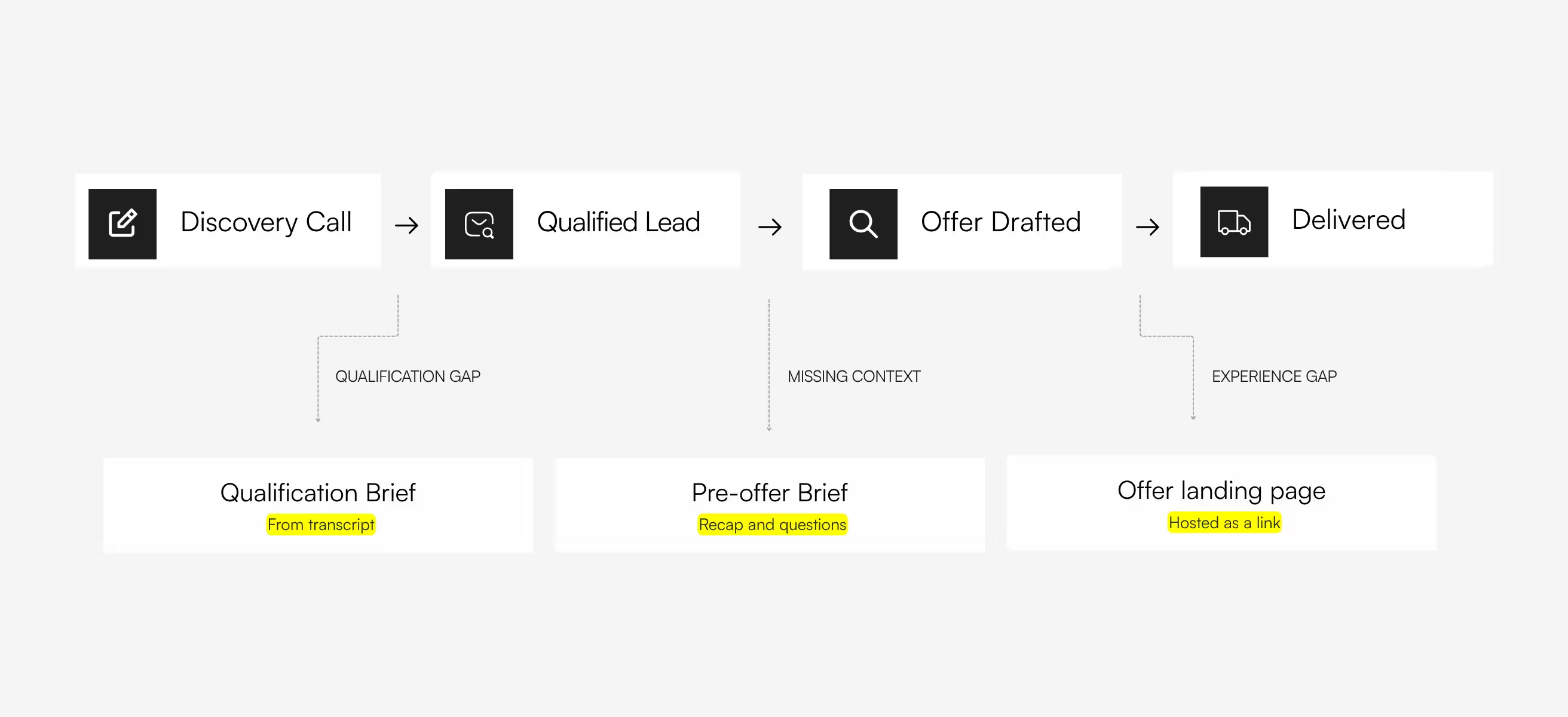
The three workflows below address those three stages. They are not theoretical. We ran the internal qualification brief on every discovery call we had in Q1 2026. We sent three offer landing pages last month instead of PDFs. The compounding effect is real.
Workflow 1: Qualify the lead before you spend an hour writing an offer
The pain
You finish a 42-minute discovery call. The prospect was interesting. Now you need to make a decision that costs hours either way:
- Do you spend the next 4-6 hours building a proposal for this lead?
- Or do you flag them as poor-fit and stop the clock?
Most sales reps skip this decision entirely. They write the offer because that is what they always do. The bad-fit deals get the same treatment as the good-fit ones. The team burns hours on prospects that were never going to close.
The deeper problem is that "qualified" means different things to different people on the team. A new SDR thinks anyone with a budget is qualified. The senior closer wants a validated PMF, decision-maker on the call, clear buying authority, and explicit budget signals. Without a shared rubric, qualification becomes inconsistent and unteachable.
The fix
After every discovery call, Claude pulls the transcript and generates a structured internal qualification brief. ICP fit scored on a 5-point scale. Pain points named with quotes. Risks and objections flagged. A clear go/no-go verdict at the bottom.
The brief is for the team, not the prospect. It sits in a shared folder. Every salesperson on the team reads briefs in the same format and learns the same qualification reflexes over time.
How it works technically
Three components:
The transcript source. Fireflies records every discovery call via calendar integration. The transcript is exposed to Claude through the Fireflies MCP connector.
The qualification skill. A markdown file that encodes our ICP rubric (what makes a prospect a 4/5 vs a 2/5), the sections every brief must contain, the question Claude has to answer when scoring, and the verdict logic at the end. The skill turns "qualification" from a vibe into a checklist.
The brief output always contains the same sections:
- Call details (date, prospect, role, duration, Fireflies link)
- Company context (what they do, where they are today)
- ICP fit verdict with a score out of 5
- Pain points (named, specific, ideally with quotes)
- Offer and next steps (what was discussed)
- Recommendations (what the salesperson does next, prioritised)
- Risks and objections (decision-maker absent, weak budget signals, stage mismatch)
- Key quotes from the call
- Action items (split by owner)
- Final verdict (pursue, nurture, disqualify)
- Campaign hooks (if not pursuing now, what triggers re-engagement)
Value for sales leaders
Three things change:
- Disqualification becomes a positive outcome. When the brief lands on 2/5 ICP fit with pre-revenue plus no validated PMF plus decision-maker absent, the team has a defensible reason to not spend 4 hours on a proposal. You save senior time without anyone needing to "say no" out loud.
- Sales reviews become structured. Every weekly sync starts with a list of briefs from the week's discovery calls. Everyone reads them in the same format. Decisions are made on a shared base of truth, not on memory.
- New reps ramp faster. A junior closer who reads 30 briefs in their first month learns what the senior reps look for - in writing, with examples - without having to shadow every call.
The brief also doubles as institutional memory. Six months later, when the prospect closes their seed round and budget unlocks, you have the original qualification doc with the campaign hook ideas already drafted. The deal does not start from zero.
Workflow 2: Send a pre-offer brief that earns you the right to quote
The pain
You qualified the prospect. They are a good fit. Now you have two paths to the offer, and both are bad.
Path A: Send the offer immediately. You skip the context-gathering and quote based on assumptions. The proposal comes out generic because half the inputs were guesswork. The prospect reads it, feels not-yet-listened-to, and ghosts.
Path B: Book a second discovery call to extract the missing context. The prospect resents the extra meeting. Half of them never reschedule. The deal cools by two weeks before you even draft a number.
There is a third path that nobody uses because it takes too long manually. Send a brief BEFORE the offer that recaps what you heard, proposes a direction, and asks the specific questions you still need answered. Done right, this kills both problems at once. Done by hand, it takes 3 hours per deal and your senior people refuse to do it.
The fix
Claude generates the pre-offer brief automatically from the internal qualification doc (Workflow 1). The output is a polished branded .docx that lands in the prospect's inbox as the next touchpoint after the call.
The document does four jobs in one artifact:
- Recaps the conversation. What we heard, what stood out, what we think the situation is. Proves active listening before any pitching.
- Names the pain points. Specifically, with reference to what the prospect said. Not generic industry pains.
- Proposes an initial direction with tech stack. Two or three options that match the prospect's stage, including the specific tools we would use to deliver. The prospect sees a real plan, not a sales narrative.
- Asks the questions we still need answered. Five to ten specific items. Budget range. Decision-makers we have not met. Timing constraints. Existing tooling. Internal context we could not extract on the first call.
The prospect answers the questions async over the next 2-3 days. We use those answers to build the offer. Total cycle from discovery call to a sharp, specific offer in their inbox: 5-7 days. The conventional path with a second call in the middle takes 2-3 weeks.
How it works technically
Two Claude skills layered together:
The content skill. Defines the structure of the pre-offer brief - cover page, recap section, identified pains, proposed direction, tech stack rationale, embedded questions list. The skill reads the internal qualification brief as input, so the content is consistent with what was captured immediately after the call.
The .docx design skill. Encodes the Vanderbuild visual system as Claude instructions: cover page layout, heading fonts, section spacing, brand colours, divider styles. The output looks polished without a designer touching it. The same skill produces every branded .docx the team needs.
The two skills run together. Claude pulls in the internal brief, applies the pre-offer content structure, wraps it in the branded .docx layer, and outputs a file ready to attach to the next email.
The skill also enforces a 3-step interview pattern. Claude asks the salesperson for any missing context before generating, drafts the brief, then refines based on review. This prevents the failure mode where you get a fast document that is subtly wrong about the prospect.
The investment is the design skill. Define your brand colours, your fonts, your standard section structure, your tone rules. That file becomes the production line for every branded document your sales team needs - briefs, proposals, retainer scopes, internal playbooks.
For a sales team running 15-20 discovery calls a month, the math is direct. At 2-3 hours of manual pre-offer work per qualified deal, that is 30-60 hours of senior time saved monthly. Replaced by 10-15 minutes per brief in review.
Value for sales leaders
Three things change:
- Prospects feel heard before they see a price. A recap brief sent within 48 hours of the call signals competence in a way most competitors do not. You stand out before you quote.
- The offer that follows is specific, not templated. Because you extracted the missing inputs async, the proposal references their exact constraints. Higher close rate, faster signature.
- Sales cycle compresses by 1-2 weeks per deal. No second discovery call needed. The prospect's answers come back in writing, on their own time, ready to feed straight into the offer.
The subtler benefit is positioning. The pre-offer brief itself is an artifact most B2B service companies skip entirely. Sending one signals that you treat the engagement like a partnership, not a transaction. By the time the prospect opens your actual offer, they have already accepted you as the obvious choice.
Workflow 3: Interactive offer page instead of a PDF
The pain
The proposal exists. It looks good. You attach it to an email and send it. Then nothing.
PDFs in 2026 have the same engagement profile as direct mail in 2010. They land in inboxes, get ignored, or get downloaded once and never opened again. You have no idea whether the prospect read it, which section they spent time on, or whether they forwarded it to a decision-maker.
The bigger problem is positioning. A PDF says "I sent you a document." A polished interactive landing page says "I built something for you." For a service company selling expertise, that difference shapes how the prospect perceives your competence before they read a word.
The third problem is the experience itself. A 12-page PDF buried in the email thread is worse-than-useless on mobile. Scrolling, pinch-zooming, no clear hierarchy. Most prospects open the proposal on their phone first. They abandon it within 90 seconds.
The fix
Send a link instead of an attachment. The link points to a single-page interactive offer site, branded fully under your visual system, hosted externally.
Hero section with the prospect's name and the proposed engagement. Diagnosis. Framework. Deliverables. 90-day schedule. Toolstack. Pricing. CTA to book the next call. Scroll-triggered fade-ins, hover effects on cards, mobile-responsive by default.
The whole page is a single HTML file. Generated by Claude. Hosted as a static site. Sent as a link.
How it works technically
Two skills do the work:
The brand HTML skill. Our visual identity codified as a Claude instruction set. It specifies the colour palette (#111111 background, #ffff00 yellow accent, #1c1c1c cards), the typography (Instrument Sans loaded from Google Fonts), the layout grid, the animation patterns. Everything Claude needs to produce a page that looks like our brand rather than a generic Tailwind starter.
frontend-design is a public Anthropic skill that handles the HTML/CSS/JS layer - responsive layout, accessibility, animation timing, mobile breakpoints. It plugs into our brand skill and handles the boilerplate.
The prompt is one sentence: "Based on the internal qualification brief and pre-offer brief for [prospect], generate an interactive offer page using the brand skill." Output is a single .html file with everything inlined - styles, scripts, content. No build step, no dependency tree, no framework. Drag and drop into any static host.
Hosting options that work in under 60 seconds:
- Vercel - drag the HTML file in, get a prospectname.vercel.app URL. Free tier.
- Netlify Drop - same workflow, different domain. Free tier.
- A subdomain on your own site - if you want full brand control (offers.yourcompany.com/prospect-name).
- GitHub Pages - free, slightly more setup, gives you username.github.io/prospect-name.
We use a custom Vanderbuild subdomain. The prospect sees offers.vanderbuild.co/[their-company] in their address bar. That single detail does more for positioning than a 12-page PDF ever could.
The first page takes 30-45 minutes to perfect because you are still calibrating the brand skill. The tenth page takes 8 minutes. By page twenty, the workflow is automatic: drop the qualification and pre-offer briefs, run the prompt, review the output, upload, send the link.
Value for sales leaders
Three things change:
- Differentiation. 95% of B2B service companies still send PDF proposals. Sending an interactive page is a positioning signal that costs you nothing and lands instantly. Prospects mention it on the next call.
- Tracking. Static hosts give you basic analytics out of the box. You know when the prospect opened the page, how long they stayed, which sections they read. PDF attachments give you none of that.
- Mobile experience. The page is responsive by default. Prospects who open the link on their phone get a real experience, not a pinch-to-zoom nightmare. Most first opens happen on mobile. This matters more than most sales leaders realise.
The qualitative benefit is harder to quantify but easier to feel. When you send a link to a polished page instead of a PDF attachment, the dynamic of the next conversation shifts. The prospect treats you as someone who builds, not someone who templates.
The pattern across all three workflows
The three workflows look different on the surface. One pulls from a transcript to qualify. One generates a client-facing document to engage. One generates a website to close.
Underneath, they follow the same shape:
- Identify a stage of the pipeline where time leaks out
- Define the structure of the desired output as a Claude skill (a markdown file)
- Connect Claude to the input data each stage needs (Fireflies for transcripts, the prior brief for context, your design system for branding)
- Replace 3-6 hours of manual work per deal with one prompt and 10-15 minutes of review
Each workflow feeds the next. The qualification brief from Workflow 1 becomes the input for the pre-offer brief in Workflow 2. The pre-offer brief plus the prospect's answers become the input for the offer page in Workflow 3. By the time the prospect sees pricing, every artifact references back to what they actually said on the discovery call.
The compounding effect comes from the skills. Once the qualification skill exists, every salesperson on the team produces structurally identical briefs. Once the design system skill exists, every branded document and offer page looks like one company built them.
The investment is the skills, not the prompts. Write them once. Reuse them on every deal forever.
The salesperson stays in the loop the whole time. What gets removed is the clerical work around them - the typing, the formatting, the re-drafting, the "let me send this over by end of week" delays. Claude eats the administrative layer between the high-value moments where deals actually move - the discovery conversation, the offer review, the closing call.
What you need to start
Two principles guide the stack:
- Skills are free. They are markdown files you write once. The competitive advantage is in the skills, not the subscriptions.
- Connectors compound. Each new system you connect to Claude (CRM, calendar, design tool, hosting) multiplies the workflows you can build on top.
If you start with just Claude Pro and one connector (Fireflies), you can implement Workflow 1 this week. Workflows 2 and 3 take one additional afternoon each.
The teams that win at AI in sales over the next 24 months will not be the ones with the most tools. They will be the ones who picked three specific stages of their pipeline, defined the output structure as a skill, and let Claude eat the manual work in between.
You already know which three stages those are. They are the ones you dread doing after a good discovery call.
If you want help mapping which stages of your pipeline leak the most time, book a 30-minute audit with us. No pitch. Worst case you leave with a list of three workflows you can build yourself this quarter.