.webp)
Most B2B SaaS Founders and Heads of Sales treat their CRM like a digital filing cabinet. In reality, your CRM is the operating system of your revenue. When that system is cluttered with duplicates, outdated titles, and "test" leads from 2022, your entire GTM motion grinds to a halt.
If your sales team complains that "outbound doesn't work" or your marketing attribution looks like a Jackson Pollock painting, you have a Data Hygiene crisis.
According to Gartner, poor data quality costs organizations an average of $12.9 million per year. For a scaling startup, this manifests as a 20-30% "tax" on every marketing dollar spent and every SDR hour billed.
In this article, you will learn:
- The Revenue Math: How bad data inflates your CAC.
- The RevOps Hierarchy of Needs: From raw data to predictive analytics.
- Architecture Best Practices: Property types that scale vs. those that fail.
- Deduplication Frameworks: Managing the "Single Source of Truth."
- Automated Enrichment: Keeping records "fresh" while you sleep.
- The Audit Cadence: A 30/60/90-day hygiene checklist.
I. The Economic Impact: Calculating the "Dirty Data Tax"
Bad data is an administrative nuisance and a financial leak. When 20% of your database has incorrect emails, 20% of your automated sequences are hitting "dead air." This is a missed opportunity and a direct hit to your Domain Reputation.
The Opportunity Cost Formula
To see the impact on your P&L, use the Vanderbuild Data Waste Formula:
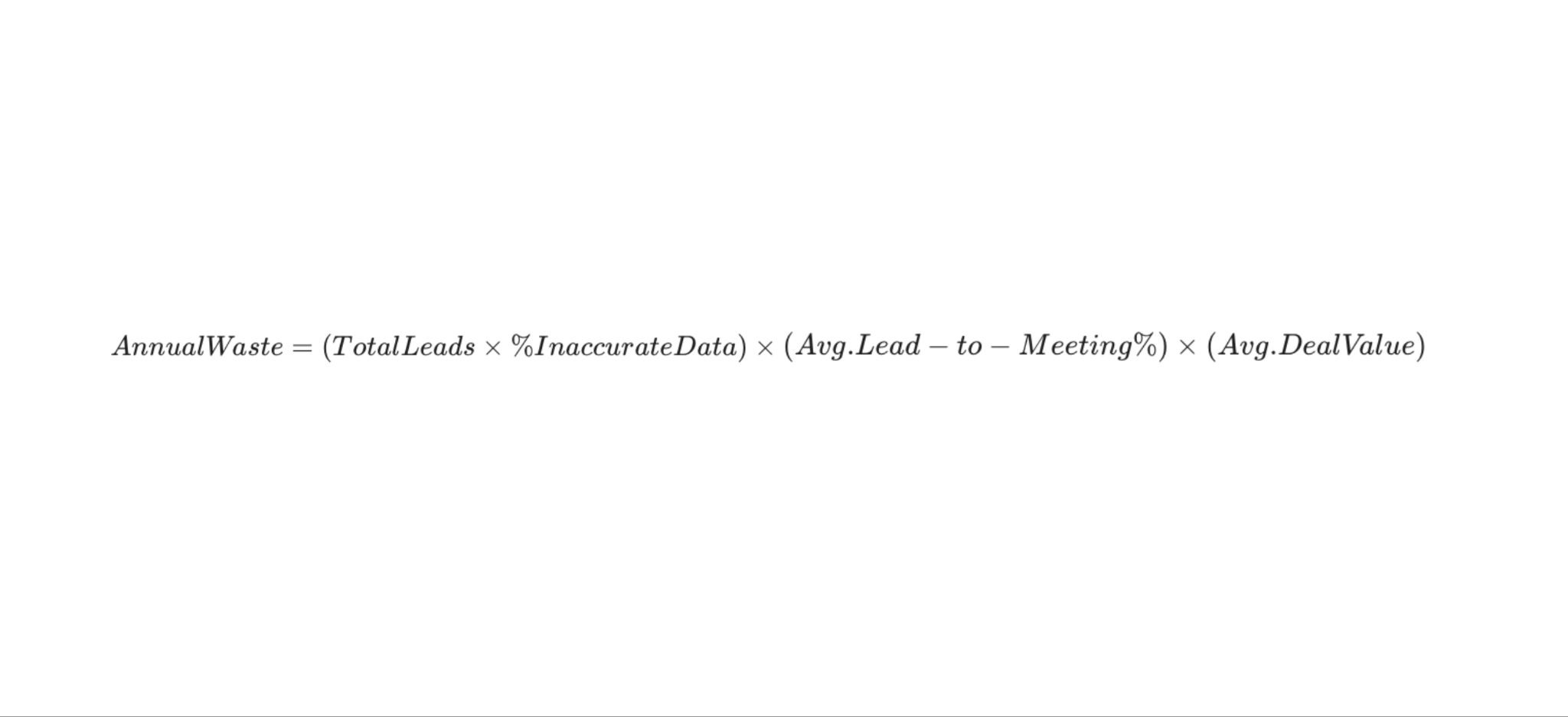
Example:
- 10,000 Leads in CRM
- 25% Inaccurate Data (2,500 leads)
- 5% Lead-to-Meeting Conversion
- $20,000 ACV (Average Contract Value)
- Total Annual Waste: $2,500,000 in potential pipeline.
If you aren't investing in hygiene, you are effectively setting a stack of cash on fire every Monday morning.
II. CRM Architecture: Building for Scale, Not Just Storage
Most CRMs are set up by an early employee who "just wants to get things moving." Three years later, you have 14 different properties for "Company Size" and 6 different "Lead Statuses" that no one understands.
1. The "Death of Free Text"
The single biggest mistake in CRM management is allowing Single-Line Text fields for categorical data.
- The Problem: One rep enters "Enterprise," another enters "ENT," and a third enters "Big Company." Your reporting is now impossible.
- The Standard: Every categorical field (Industry, Company Size, Lead Source, Region) MUST be a dropdown or multiple-choice picklist.
What is also very interesting, experts and organizations already solved this problem by introducing best standards to the CRM data maintenance and structures BUT NO most teams jump on a workshop and come up with their own “PERFECT” solution for data structure and maintenance. The key thing is that there are already ways of solving this problem that considered way more scenarios but everyone thinks they know better starting from scratch. Key insight: follow the top voices on the matter and copy frameworks from the best in the industry.
2. Required Fields vs. Friction
You want data, but your SDRs want speed.
- The Balance: Only make fields "Required" if they are essential for Routing or Reporting.
- Crucial Fields: Lead Source, ICP Segment, Country, and Unique Identifier (LinkedIn URL or Domain).
In the perfect scenario every data in your CRM should be enriched automatically based on the full name and domain of the organisation by adding simple enrichment workflows. Sales people should only work on notes, tasks, stages - not filling the missing data.
3. Lead-to-Account (L2A) Mapping
In B2B SaaS, you sell to companies, not just people. Your CRM architecture must support a clear relationship between "Contacts" and "Accounts." If "John Doe" is a lead but his company "Acme Corp" already has an open Opportunity, your rep is about to look like an amateur by cold-calling him.
Working only on Contacts or Companies is a huge mistake. CRMs of the world solved that for you. Follow the instructions.
III. The RevOps Hierarchy of Needs
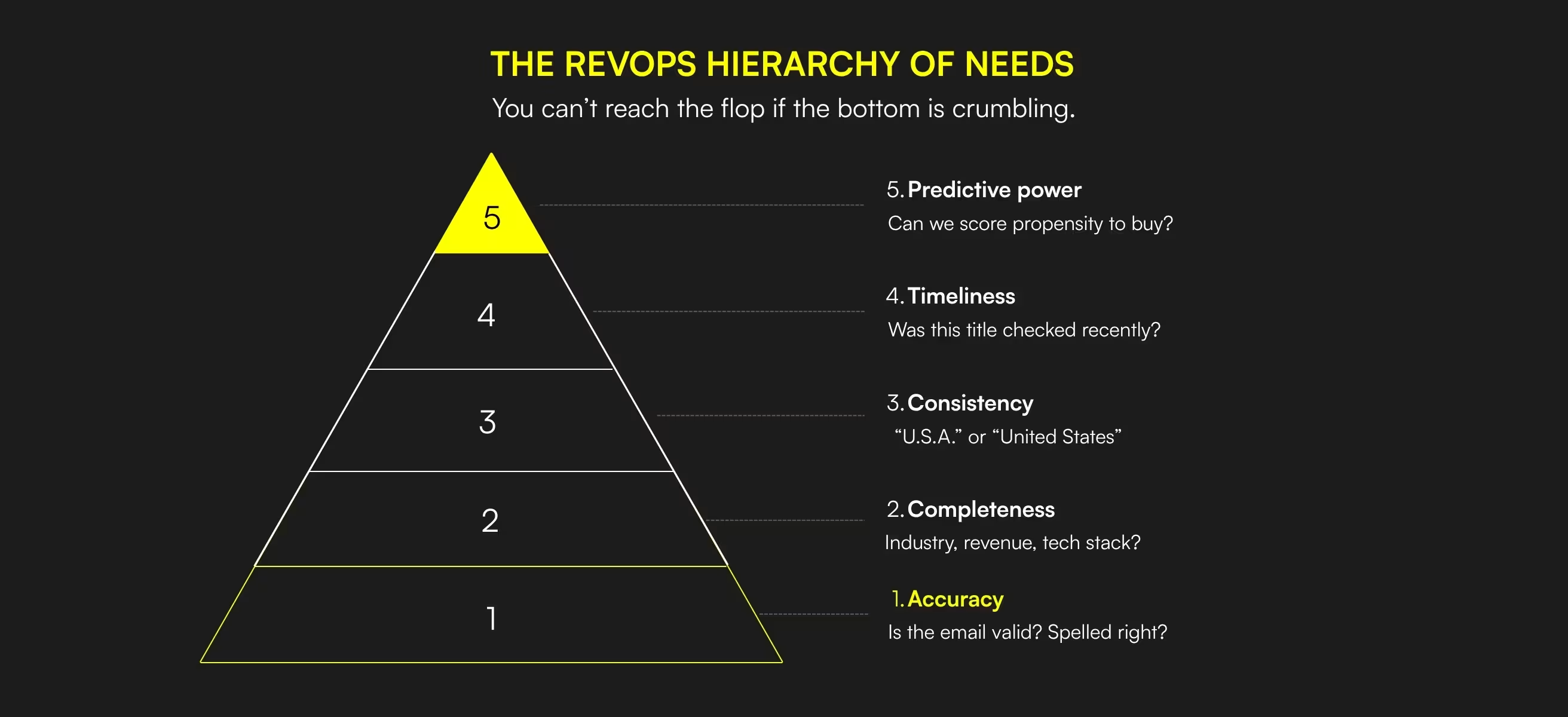
Think of your CRM data like Maslow’s Hierarchy. You cannot reach the top (AI-driven forecasting or nurturing) if the bottom (Accuracy) is crumbling.
- Accuracy (The Foundation): Is the email valid? Is the name spelled correctly?
- Completeness: Do we have the Industry, Revenue, and Tech Stack?
- Consistency: Is "U.S.A." labeled as "United States" across all 5,000 records?
- Timeliness: When was the last time this person’s title was checked?
- Predictive Power: Can we use this data to calculate our "Propensity to Buy"?
IV. Deduplication: The "Single Source of Truth" Battle
Duplicates are the silent killers of sales morale. When two reps call the same prospect because "John.Doe@google.com" and "John.D@google.com" exist as separate records, you lose all credibility.
Deduplication Framework:
- The Unique Identifier: Never rely on "First Name + Last Name" for deduplication. Use Company Domain + Personal LinkedIn URL.
- The Master Record Logic: When merging, which data wins?
- Rule of Thumb: The record with the most recent "Last Activity Date" or the one synced from the primary billing system (Stripe) should usually be the "Survivor."
- Automated Tools: For HubSpot, use Operations Hub. For Salesforce, use Cloudingo or DemandTools. For early-stage startups, use Clay to scan your CRM via API and flag duplicates based on domain similarity.
V. Data Enrichment: The "Live" Database
Data is a perishable good. In B2B, it decays at a rate of approximately 2.1% per month. If you haven't touched a record in six months, there is a 12% chance it is already wrong.
The Automated Enrichment Loop
Don't wait for a rep to update a record. Use Waterfall Enrichment (as discussed in our Clay guide) to keep data fresh.
- Trigger: Lead moves to "MQL" or "Discovery Scheduled."
- Action: Clay triggers an enrichment sequence to verify the current Title, Company Size, and Tech Stack.
- Sync: The updated data is pushed back to the CRM property.
The Vanderbuild Standard: Every contact in your "Target Account" list should be re-enriched every 90 days regardless of activity. That’s also the best way to start the lead nurturing process. If the lead changed their workplace then that’s a perfect situation to reheat the relationship, send congratulations, and show up on their radar.
VI. Lead Routing & Scoring: The "Data-Driven" Traffic Cop
Hygiene is about cleaning and routing. If your "Region" field is empty, your automated routing rules won't know whether to send a lead to your US or EMEA team or to send communication in German or English.
Scoring is only as good as your data
If you give +10 points for "Enterprise" companies, but your "Company Size" field is 40% empty, you are missing 40% of your high-priority leads.
- Hygiene Hack: Create a "Data Completeness Score" for every lead. If the score is below 70%, don't send it to Sales. Send it back to an automated enrichment workflow (Clay) to fill in the blanks.
VII. The Quarterly Audit: A 5-Step Checklist
Data hygiene is not a "one and done" project. It is a recurring maintenance task. Every 90 days, your RevOps lead or Founder should perform the following:
1. The "Ghost Lead" Purge
Identify contacts who haven't opened an email, visited the site, or had a sales activity in 12+ months. Move them to a "Cold Archive" or delete them to save on CRM storage costs.
2. Dropdown Integrity Check
Look for properties that have been bypassed. If 20% of your "Industry" field is "Other," it’s time to update your picklist options.
3. Bounce Rate Analysis
Filter your CRM for contacts marked as "Bounced" in your marketing tool (HubSpot/Mailchimp).
- Action: Use a waterfall (Clay) to find their new company/email. They likely just changed jobs-this is a warm lead opportunity.
4. Role-Based Standardization
Ensure titles are categorized. "VP of Sales" and "Head of Sales" should both map to a hidden Persona_Seniority field = Executive.
5. Attribution Cleanup
Check for leads where "Original Source" is empty. Trace back their first touchpoint. Without this, you cannot calculate your CAC by Channel.
VIII. CRM Migration: The "Fresh Start" Framework
If your current CRM is so messy that it’s unfixable, you might be considering a migration (e.g., Pipedrive to Salesforce). Warning: Migration does not solve bad data; it only moves it.
How to Migrate Without Moving the Mess:
- The "Filter First" Rule: Only migrate contacts that fit your current ICP. If you pivoted from B2C to B2B two years ago, leave the B2C data behind.
- Standardize before Export: Fix your naming conventions in the CSV before importing into the new CRM.
- The "Fresh Enrichment" Export: Run your entire export list through a verification tool (NeverBounce) before the import. Start your new CRM with a 0% bounce rate.
IX. Data Privacy & Compliance (GDPR/CCPA)
In 2026, data hygiene is a legal requirement. Under GDPR, you have an obligation to keep data accurate and delete it when it is no longer necessary.
- Right to be Forgotten: Your CRM must have a "Hard Delete" workflow for opt-outs.
- Legal Basis Tracking: You should have a field for Legal Basis for Processing. Was it "Legitimate Interest" (Outbound) or "Consent" (Inbound)?
- Data Minimization: If you don't need a prospect's personal phone number for business, don't store it. Clean data is low-risk data.
X. FAQ: Practical CRM Hygiene Realities
Q1: Who should own CRM hygiene?
In the early stages ($0-$2M ARR), it’s the Founder or Head of Sales. Once you hit $5M ARR, you need a dedicated RevOps (Revenue Operations) hire. Data is too important to be a "side project" for an SDR.
Q2: How often should I clean my data?
Real-time for normalization (via automation), weekly for deduplication, and quarterly for deep-cleaning audits.
Q3: Is it okay to delete leads?
Yes. A CRM with 10,000 "Valid" leads is worth 10x more than a CRM with 100,000 "Garbage" leads. Quality over quantity is the mantra of high-LTV SaaS.
Q4: Which CRM is best for data hygiene?
HubSpot is generally easier for startups to maintain because of its user-friendly interface and "Operations Hub." Salesforce is more powerful but requires a dedicated admin to prevent it from becoming a "Digital Dumpster" within six months.
Q5: Can AI fix my CRM data?
AI (like Claygent or ChatGPT) is incredible for enrichment and standardization (e.g., "Take this messy list of job titles and categorize them into 5 groups"). However, AI cannot fix a broken architecture. You need the framework first.
Q6: What is a "Healthy" bounce rate?
Anything under 2% is world-class. Between 2% and 5% is a warning sign. Over 10% and your domain is in serious danger of being blacklisted by Google and Microsoft.
Q7: How do I handle "Test" records?
Create a view that filters out any email containing "test", "example", or "[podejrzany link usunięto]". Better yet, create a workflow that automatically deletes any record created with an @example.com or @test.com domain.
XI. The "Vanderbuild" Take: Your CRM is a Moat
In a world where everyone is using the same AI tools to send the same emails, your data is your only unique advantage. If your CRM knows exactly which accounts are in a "Buying Window," who the key stakeholders are, and which tech they currently use, you will win. If your CRM is a cluttered mess of 2021 job titles, you will spend your Series B funding on SDRs who are essentially shouting at empty rooms.