.webp)
Clay.com is a powerhouse for data orchestration, but poor configuration leads to massive credit waste and low-quality output. The most common failures involve linear enrichment instead of "Waterfall" logic and pushing uncleaned data to CRM / Engagement tools. A professional setup functions as an automated filter, ensuring only high-intent, verified leads reach your sales team. This guide provides technical fixes to transform your Clay workspace into a high-efficiency revenue engine.
In this article, you'll learn:
- Mistake Identification: Common setup errors that derail Clay implementations
- Step-by-Step Fixes: Practical remediation approaches for each mistake
- Long-Term Benefits: How correct configuration improves operational efficiency
- Success Checklist: Verification steps to ensure proper setup completion
Why Does Your Clay Setup Define Your Marketing & Sales Success?
In modern SaaS, your data architecture is your destiny. If your Clay setup is chaotic, your marketing & sales will be too. Clay has become the industry standard not because it has its own massive database (like Apollo or ZoomInfo), but because it allows for the intelligent orchestration of dozens of sources into a single, cohesive process.
Linear vs. Waterfall Enrichment: The Cost-Saving Difference
Most beginners set up enrichment linearly: they run five different email finders simultaneously for every single record. If you have 1,000 leads and 5 providers, you pay for 5,000 queries - even if the first provider found the correct address. Waterfall logic ensures that Provider B is only triggered if Provider A returns an empty result. For a SaaS team, this translates to thousands of dollars saved annually.
Clay Without Logic is Just an Overpriced Apollo
Without filters, conditional runs, and AI scoring, Clay is simply an expensive interface for databases. The platform's true value emerges when the system "thinks": "If the company is currently hiring for engineering roles AND uses AWS, then trigger a deep AI research scrape; otherwise, stop at basic enrichment."
The Top 10 Mistakes in Clay Setup
1. The Linear Enrichment Trap (No Waterfall Logic)
The Problem: Querying all data providers, regardless of whether valid data has already been found.
The Cost: You burn through your monthly credit limit in days instead of weeks.
The Fix: Implement Conditional Runs. In the settings for your enrichment column, select "Run only if..." and target your primary email column. Set the condition to run only if that column is empty.
- Pro-Tip: Order your waterfall by cost and accuracy. Put your most accurate/expensive providers (like Findymail or Prospeo) first, and fallback to broader databases later.
Within column settings slide down to the bottom to “Run settings” and either code your logic or use AI as in example below:
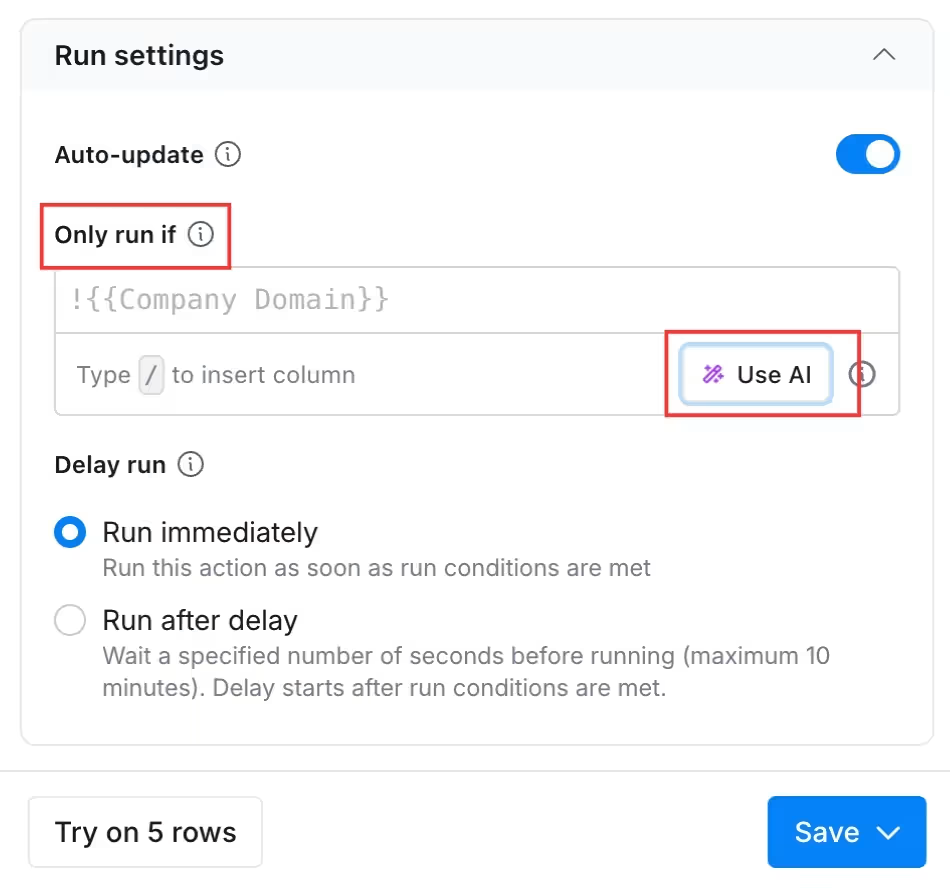
Basically type in the conditional logic you would like to implement as in example below and click generate formula - the system will then code the formula and show you the coded output on the right:
.avif)
2. Over-utilizing "Claygent" Without Prioritization
The Problem: Running expensive GPT-4 powered AI web-scrapes on every lead in your list, including low-fit accounts or "Tier 3" prospects.
The Cost: High operational costs and slow table processing speeds.
The Fix: Implement a "Tiering Filter." Use Clay's native filters to score leads based on ICP fit (Employee count, Revenue, Funding). Only trigger Claygent or AI-heavy columns for leads with a score above a certain threshold or use simple qualification criteria. For lower-tier leads, stick to basic enrichment.
Below you can see that we used a simple qualification based on the materials that prospects from this company were researching on our client’s website. Based on initial qualification we decreased enrichment cost for further analysis by 75% disqualifying irrelevant interest signals.
.avif)
3. Ignoring "Company Name" Normalization
The Problem: Exporting names like "ACME CORP INTERNATIONAL LLC" or "GOOGLE INC. - HQ" into your email templates. This screams "bot" and leads to instant deletion.
The Cost: Plummeting reply rates and a damaged brand reputation.
The Fix: Use the "Clean Company Name" helper. This native tool uses regex and AI to strip legal suffixes and descriptors. It transforms "The Coca-Cola Company" into "Coca-Cola," making your automated outreach look like it was typed by a human.
In this case scenario we cleaned up these records to be transferred as clean data to CRM and to outbound outreach. For this enrichment you can use:
- native Clay name normalisation which will clean up CAPITAL LETTERS into Normal Letters
or
- you can use AI to normalize content:
.avif)
For this enrichment we used this simple prompt:
Take this company name and normalize it so it could be used in an email. Cut out unnecessary elements so it doesn’t sound like it’s been pulled from a data source, but rather that you know the company. Cut out elements like corp or other things that sound too formal.
E.g.:
Input: {{company name}}
output: {{expected output}}
Input: {{company name}}
output: {{expected output}}
Input: {{company name}}
output: {{expected output}}
4. Skipping In-Table Email Validation
The Problem: Trusting enrichment providers blindly. Even the best providers return "catch-all" or "invalid" emails occasionally.
The Cost: High bounce rates (above 3%) will result in your email domain being blacklisted by Google and Outlook.
The Fix: Add a mandatory "Validate Email" step as the final gate in your workflow. Use tools like Debounce, NeverBounce, or Clay’s native validator. Set a rule: If status is not "Deliverable," do not export to CRM.
The Setup in this case scenario should look like this:
- Right click on waterfall column output.
- Go to Column Options.
- Pick “Full Configuration"
.avif)
- Slide down to validation option and pick relevant email validation option:
.avif)
In the table view this validation will be added after each waterfall step:
.avif)
5. Messy Data Mapping
The Problem: Pushing raw JSON objects, unformatted strings, or internal technical notes directly into CRM fields.
The Cost: A cluttered CRM that becomes unusable for your AEs and marketing teams.
The Fix: Use Formula Columns to map clean, specific strings or define clean JSON output structures for each data enrichment column. Before pushing to your CRM, create a "Final Sync" folder in your table where every column is formatted exactly as the CRM expects it (e.g., proper casing for names, cleaned URLs).
Below you can see example differences in data output based on our project for agentic ai research and companies segmentation.
Our task was to:
- define the type of the analysed company,
- assign tag
- create brief descriptions of:
- tech used,
- if the company has relevant agentic ai case studies,
- service offering,
- multimodal agentic ai capabilities.
Same prompt but with different JSON defined output:
NOT STRUCTURED OUTPUT
.avif)
STRUCTURED OUTPUT
.avif)
You can create structured output within Clay by using JSON:
- slide down while creating your agent,
- find “Define Outputs” option,
- Click: “JSON Schema”
- Click: “Generate from prompt
or - Generate using chat - if the prompt you created is too long
.avif)
6. Failure to Deduplicate Before Enrichment
The Problem: Paying to enrich the same contact or company multiple times across different campaigns or tables.
The Cost: Direct credit waste and annoying prospects by sending them duplicate sequences from different SDRs.
The Fix: Use the "Deduplicate" feature at the domain or email level as the absolute first step in your workflow. If you are importing from a CRM, ensure you are using a "Unique ID" mapping to prevent overwriting existing clean data.
To deduplicate records automatically you can use table settings - you can find it in the bottom right corner of the table:
1. Look for “Deduplication”
2. Click the slider to enable deduplication.
.avif)
3. Then click on drop down and pick deduplication column e.g.: LinkedIn URL
4. And then pick if you want to leave the oldest or newest record.
.avif)
This option will keep your data clean and ensure wise credit spending.
Additionally you can use features such as:
- Lookup multiple or single records function in Clay to get data from other tables and workbooks.
- Use CRM lookup function to pull data from your main source of truth.
- Use HTTP API or Clay native integrations to get data from any other data source.
7. Vague AI Prompting (The "Generic Output" Problem)
The Problem: AI-generated openers like "I saw your website and liked your services," which are so generic they actually hurt your conversion more than a template would.
The Cost: Low engagement and a "spammy" feel to your outreach.
The Fix: Use Few-Shot Prompting. In your Claygent or GPT column, don't just ask it to "write an opener." Instead, give it 3 examples of what a good opener looks like for your brand. Tell the AI exactly what to look for (e.g., "Find a specific quote from their last podcast appearance").
.avif)
Treat it as an instruction layer for your ai agent to help you prepare good copy prpompts or craft cold email messages.
8. Manual CSV Uploads vs. Automated Imports
The Problem: SDRs manually uploading CSVs once a week, working on stale data that doesn't account for real-time job changes or funding news.
The Cost: Missed windows of opportunity.
The Fix: Set up Auto-Imports. Connect Clay directly to your CRM "New Lead" views or a LinkedIn Sales Navigator search. This turns your Clay table into a 24/7 engine-leads enter, get enriched, and get pushed to sequences while your team sleeps.
The real value you get out of Clay unfortunately starts with Explorer or Pro plan - then you can do REAL data orchestration. The Starter version is based on csv. upload download with minimum data push capabilities to other systems.
9. Lack of Credit Monitoring & Thresholds
The Problem: people mistakingly test whole tables on the data they prepare - that’s wrong.
The Cost: Accounts depleted of credits.
The Fix: Always test your prompts on 10 rows, then on 50-100 and then on 1000s.
Firstly we test system on 10 rows
.avif)
Then we use run a column function and we pick first 100 rows to test:
.avif)
We never run the full system on all of the records before proper testing.
10. Use filters in Clay instead of creating endless tables
The Problem: Treating every new segmentation idea as a new table. “One for SaaS founders”, “one for Series A”, “one for Poland”, “one for webinar attendees”… and suddenly Clay becomes a maze of half-duplicated lists.
The Cost: Dirty data, duplicated work, and broken ownership. You enrich the same accounts twice, columns drift between tables, and nobody trusts which table is the “source of truth” when it’s time to launch outbound.
The Fix: Keep one master table per market motion (ICP or campaign theme), then use Clay filters + views to slice it for execution.
- Add a few durable columns: ICP_Fit, Segment, Geo, Seniority, Intent_Level, Last_Enriched_Date, Do_Not_Contact
- Build saved views like: “ICP Fit = High + Geo = DACH + Intent_Level = Hot”
- Trigger enrichments and outbound only from filtered views (not from random new tables), so the workflow stays predictable and the data stays clean
Key habit: if you can express it as a filter, it should not become a new table. This keeps your Clay setup scalable and makes it easier to audit campaigns when performance dips.
In this case we created views for:
- Qualified accounts
- 2-200 Qualified headcount accounts
- 201+ Qualified headcount accounts
.avif)
These views will allow you for easier filtration on particular groups of prospects and further enrichment or sending data to other tables.
You can create view by:
1. Duplicating default view.
.avif)
2. Setting up proper filters.
.avif)
3. Renaming default view.
.avif)
Visualizing the Ideal Clay Architecture
To avoid the mistakes above, visualize your Clay table as an assembly line consisting of five distinct stages:
- Stage 1: The Intake (Inputs)
- Sources: CRM Sync, Inbound Webhooks, LinkedIn Scrapes.
- Action: Deduplicate immediately.
- Stage 2: The Machete (Hard Filters)
- Action: Filter out anyone who doesn't fit your ICP (Geo, Industry, Keywords). Don't spend a single credit on a lead that isn't a "Buyer."
- Action: Filter out anyone who doesn't fit your ICP (Geo, Industry, Keywords). Don't spend a single credit on a lead that isn't a "Buyer."
- Stage 3: The Waterfall (Data Discovery)
- Action: Sequential Email/Phone discovery. Provider 1 → 2 → 3.
- Action: Sequential Email/Phone discovery. Provider 1 → 2 → 3.
- Stage 4: The Brain (AI Enrichment)
- Action: Claygent performs deep research on Tier-1 leads. GPT-4 cleans the company name and writes the personalized hook.
- Action: Claygent performs deep research on Tier-1 leads. GPT-4 cleans the company name and writes the personalized hook.
- Stage 5: The Gatekeeper (Verification & Delivery)
- Action: Final email validation. Human QA check. Direct sync to your engagement tool.
We will always encourage our clients and our internal team to create a structure of a process to be implemented in any Whiteboard in MIRO / Canva / Figma before jumping to Clay.
Measuring Your Clay Efficiency (KPIs)
If you cannot measure your setup, you cannot optimize it.
Track these three KPIs:
- Match Rate %: How many leads are actually being found across your waterfall? If it's below 70%, you need better providers.
- Verification Rate: What % of "found" emails pass the "Deliverable" check?
- Cost per Enriched Lead: Calculate your total credit spend divided by the number of leads that actually reach your CRM.
Formula:
Cost_{total} / Leads_{verified} = Efficiency_{score}
Checklist: Is Your Clay Table Ready for Scale?
Top Clay agencies (Claygencies) worth knowing
Clay is only as good as the system built around it. That's why a new category of agency has taken over the top of the outbound market - the "Claygency." These teams run entire go-to-market operations through Clay, Smartlead, and HeyReach, targeting on real-time signals instead of static bought lists. The category splits into three buckets, and picking the wrong one is the most common hiring mistake:
- Outbound execution shops - they run the campaigns for you. Fast to results, but the workflows leave when the contract ends.
- Clay consultancies - they build the tables, enrichment waterfalls, and documentation, then hand it back. Only works if you have an in-house operator to run it.
- Full GTM systems builders - Clay sits as the spine of a full revenue stack: outbound, inbound routing, signal monitoring, CRM hygiene, and reporting.
Here are the names that come up most across the NA and EU market:
- Vanderbuild (Europe) - full GTM systems builder. Founder Mateusz Sekta placed #2 globally and #1 in Europe at Clay Cup 2025, Clay's first live GTM-engineering championship. The team holds four Clay University certifications and runs Clay as the operating layer feeding Instantly and HeyReach across outbound, CRM data orchestration, and consulting based on intent signals. Best for: B2B SaaS and software teams that want an owned system, not a rented pipeline.
- Growth Engine X (NA) - run by Eric Nowoslawski, often called the "godfather of Clay." High-volume outbound with the operational rigor to hold deliverability at scale. Best for: teams that want maximum outbound volume without breaking reply rates.
- The GTM Engineering Company (NA) - founded by Jorge Macías (Y Combinator), 100+ GTM systems built. Tool-agnostic, fractional GTM engineering wired into your full revenue stack. Best for: Seed-to-Series-B startups with no in-house RevOps.
- ColdIQ (NA/EU) - coaching-heavy model that builds workflows and trains your team to run them. Best for: companies that want to build in-house capability while getting expert execution now.
- OneAway (NA) - Clay Enterprise Partner with a deep library of battle-tested tables across 50+ engagements. Best for: outbound automation and CRM hygiene at productized scale.
Pros of working with a Claygency: signal-based targeting that beats list-based outbound by a wide margin, faster time-to-pipeline, multi-channel orchestration in one system, and (with the right partner) full ownership of the workflows.
Cons to watch for: if an agency won't transfer ownership of your Clay workspace, domains, and workflows, you're renting pipeline, not building it. Beg-off signals include reporting on opens and clicks, $20K strategy decks before anyone touches a sequence, and a team that can't name its exact stack in 30 seconds.
If you want a Clay system your team actually owns - built by the highest-placed European team at Clay Cup 2025 - talk to us.
FAQ
What is "Waterfall Enrichment" and why is it the #1 fix?
Standard setups use Linear Enrichment, where you query multiple data providers simultaneously. This wastes credits. Waterfall Logic ensures that Provider B is only triggered if Provider A fails to find a result.
The Benefit: You can increase your data match rate by up to 85% while significantly lowering your cost per lead.
How can I stop burning through my Clay credits so fast?
The most common "credit killers" are running expensive AI scrapes (Claygent) on every lead and skipping deduplication.
The Fix: Implement a Tiering Filter. Use Clay’s native filters to score leads by ICP fit. Only trigger AI-heavy columns for "Tier 1" prospects. For the rest, stick to basic, cheaper enrichment. Also, always Deduplicate at the domain or email level as your very first step.
Why shouldn't I create a new table for every segment or campaign?
Creating endless tables (e.g., "SaaS founders," "Series A," "Germany") leads to "data drift" and duplicate enrichment costs.
The Fix: Maintain one Master Table per ICP/Market and use Views. If you can define a segment using a filter (e.g., Country = DACH + Intent = High), it should be a View, not a new table. This keeps your workspace scalable and your data clean.
Is it possible to automate Clay without manual CSV uploads?
Yes. Relying on manual uploads keeps your data stale.
The Fix: Use Auto-Imports. Connect Clay directly to your CRM "New Lead" views or a LinkedIn Sales Navigator search. This transforms your setup into a 24/7 engine that enriches and pushes leads to your sequences automatically.