.webp)
In this article you'll learn:
- The fundamentals of orchestrating B2B sales data across multiple systems
- How to automate data flow between key sales tools for consistent information
- Best practices for maintaining data hygiene and reducing manual errors
- Tools that enhance data orchestration efficiency and streamline operations
Who is B2B sales data orchestration for (and who is it not for)?
FOR: Teams managing complex sales ecosystems
Sales Operations Managers who need standardized data processes across multiple platforms will find orchestration essential. When your team uses separate tools for lead capture, CRM management, email sequencing, and analytics, manual data entry becomes a bottleneck that orchestration eliminates.
Marketing leaders aiming for streamlined lead management benefit significantly from orchestration. The ability to track leads from first touch through closed deals requires seamless data flow between marketing automation platforms and sales systems.
FOR: Growth-focused organizations
Tech-forward founders looking for scalable solutions recognize that orchestration prevents data chaos as teams grow. Early-stage companies can implement orchestration frameworks that scale with their expanding tool stack and team size. Ensuring great data flow between systems in the early stage gives you way less problems later on so it is worth investing smaller capital early not to pay a lot more where processes will be more demanding and actually managing data.
Organizations with multiple sales channels, complex lead routing requirements, or teams spread across different time zones need orchestration to maintain data consistency and operational efficiency.
NOT FOR: Simple operations with minimal tools
Small teams not utilizing multiple sales tools may find orchestration unnecessarily complex. If your entire sales process runs through a single CRM with minimal integrations, basic automation features within that platform may suffice. BUT if you are thinking on expanding your tool stack or about specific add-ons such as automated lead qualification etc. - then it is good to meet with our consultants.
Organizations with low data volume or simple, linear sales processes don't require sophisticated orchestration. Teams handling fewer than 50 leads per month with straightforward deal flows can manage effectively with manual processes, unless these processes are repetitive to the point where they could be automated, decreasing the amount of manual work.
NOT FOR: One-time fix expectations
Teams expecting a one-off fix without continuous management will struggle with orchestration success. Data orchestration requires ongoing maintenance, regular audits, and continuous optimization to deliver value. Organizations unwilling to invest in proper governance and system management should avoid orchestration implementations.
Why does B2B sales data orchestration matter right now?
Market signal: Multi-tool ecosystem complexity
The modern B2B sales environment increasingly relies on specialized tools for different functions. Teams typically use separate platforms for prospecting, email automation, CRM management, proposal generation, and analytics. This specialization creates natural data silos that orchestration addresses.
Industry data shows that 95% of enterprise IT leaders struggle to integrate data across systems, highlighting the widespread nature of this challenge. The complexity compounds as teams add new tools to address specific needs without considering integration requirements.
Buying behavior shift: Data-driven personalization demands
B2B buyers expect personalized engagements based on their specific needs, company characteristics, and interaction history. This personalization requires comprehensive data about prospects and customers that spans multiple touchpoints and systems.
Sales teams need unified customer views to deliver relevant messaging and appropriate follow-up sequences. Without orchestration, representatives often lack complete context about prospect interactions across different channels and team members.
Internal team pain: Manual data entry inefficiency
Sales representatives spend significant time on administrative tasks rather than selling activities. Manual data entry between systems, duplicate record cleanup, and information verification consume valuable hours that could focus on prospect engagement.
Think of it - if one sales spends 5-10 minutes per prospect on filling data:
- website
- linkedin url
- personal
- company
- address
- Tax ID
- industry
- …
Then depending on amount of leads you can save:
- 20 leads / month = 100 - 200 minutes saved = 1.6 - 3.3 hours saved
- 50 leads / month = 250 - 500 minutes saved = 4.1 - 8.3 hours saved
- 100 leads / month = 500 - 1000 minutes saved = 8.3 - 16.6 hours saved
Not to mention client files creation, proper folders + files naming, filling proper tax data in CRM, setting up clients communication channels, transferring client inquiry to specialists etc. or unqualified leads filtering.
- All of these tasks add up but it could be handled by automation workflows.
The hidden costs of manual processes extend beyond time investment. Data entry errors, inconsistent formatting, and missing information create downstream problems that affect forecasting accuracy and customer experience quality.
External trigger: Real-time decision requirements
Competitive B2B markets demand rapid response times and informed decision-making. From website forms filled out or email received you have ONLY 20 minutes to reply. After that your potential clients lose interest or go to your competition. Teams need immediate access to current pipeline data, lead scoring information, and customer interaction history to respond effectively to opportunities and challenges.
Treat your CRM as one-source-of-truth - integrate every data in one place and then automate lead flow segmenting leads that should be coming to senior sales reps, presales consultants or would require more information from the lead that cannot be qualified nor unqualified.
Usually data segmentation looks like this - simple:
- Tier 1 - qualified lead - perfect fit - strong problem defined -> move directly to senior salesman
- Tier 2 - qualified lead - qualified-low priority type company - low information -> move to presales qualifier
- Tier 3 - cannot determine lead - unidentified company - low information -> automated email from presales inbox asking for more information
- Unqualified lead - unqualified enquiry - unqualified lead type -> automatically set as unqualified and set proper statuses in your CRM
Only on unqualified leads you are saving time by:
- automatically checking inquiry, prospect type, company qualification,
- marking lead as unqualified,
- setting proper lost reason (salesman often don’t fill this info),
- cleaning pipeline depending on your lead -> deal flow
For such action you save 10-15 mins per lead:
- 20 leads / month = 200 - 300 minutes saved = 3.3 - 5.0 hours saved
- 50 leads / month = 500 - 750 minutes saved = 8.3 - 12.5 hours saved
- 100 leads / month = 1,000 - 1,500 minutes saved = 16.6 - 25.0 hours saved
Organizations using outdated or fragmented data struggle to make strategic decisions about resource allocation, territory management, and product positioning. Real-time orchestration enables data-driven strategic responses.
What is B2B sales data orchestration in practice?
Step-by-step integration framework
B2B sales data orchestration involves connecting your CRM system with data orchestrators + enrichers, marketing automation platforms, lead generation tools, email sequencing software, and analytics dashboards. Each integration point requires mapping data fields, establishing synchronization rules, and defining update frequencies.
The best tool for data orchestration is either the CRM you use or another type of tool: a data orchestrator such as Clay that allows you to connect with more than 150 datapoints.
The practical implementation starts with auditing existing data flows and identifying integration points. Teams map current manual processes, document data sources, and define desired automated workflows before selecting orchestration tools or building custom integrations.
Data orchestrators allows you to take data from every filled website form, put it in the simple table view as a unique record and enrich the incoming lead based on the provided data.
Once you get email you usually get:
- first name,
- last name,
- company domain,
and knowing data correlations, based on this input you can probably find:
- personal linkedin profile,
- company linkedin profile,
and having this data you can:
- get company details:
- company description,
- headcount,
- location,
- additional sales intelligence,
- get personal details:
- job title,
- headline
- phone number
- experience
And based on that you know that you can properly segment your leads for further qualification or pick relevant sales funnels.
Integration framework step by step usually looks like this:
- Map current data sources - how data lands in your CRM?
- Map additional data inputs in your processes - How the data is being added in particular deal stages?
- Prepare proper qualification criteria - who is and who is not your client?
- Prepare proper segmentation criteria - how the perfect leads look like, which leads would require additional check to progress in the funnel?
- Map out notification, comms and files creation processes - what happens in each stage of our sales processes? Do we have templates or even certain processes in place for these 3 categories?
Cross-functional ownership model
Sales Operations teams typically own orchestration strategy and implementation, working closely with IT departments for technical execution. Marketing Operations contributes requirements for lead handoff processes and campaign attribution needs.
In perfect case scenario the ownership for all of the processes should look like this:
- Top and middle of the funnel - Marketing
- Bottom of the funnel, Win stage - Sales
- Onboarding - General Management, Account Executive
- Adoption and Expansion stage - Key Account Manager
And for the whole automation systems in each stage should be responsible either Automation Manager or GTM Engineer.
The ownership model includes defined responsibilities for data quality monitoring, integration maintenance, and user training. Clear escalation paths ensure quick resolution when synchronization issues or data conflicts arise.
Synchronized data outputs
Successful orchestration produces unified customer records that reflect all interactions across systems. Lead scoring updates automatically based on website behavior, email engagement, and sales activities. Pipeline data stays current across all platforms simultaneously.
The orchestrated system generates consistent reporting across teams, eliminates duplicate data entry, and provides real-time visibility into lead progression through the sales funnel. Once you have clean CRM data you can start activating them in additional processes such as:
- Automated lost opportunities nurturing.
- Semi-automated account expansion.
- Automated sales offer creation.
What problem does B2B sales data orchestration solve?
Data management
Four problems, and what causes each one
| Problem | What it looks like | Where it comes from |
|---|---|---|
| The record has no owner | Two reps see two different statuses on the same account, both write to it, and one of them contacts a company that is already in a live deal. | Every tool that touched the account created its own version of it, and nobody ever declared which system holds the truth for which field. |
| Handoffs are manual | Marketing passes a lead over, it sits unassigned for four days, and by the time someone calls, the buyer has spoken to two competitors. | The status changes in one system and nothing downstream is listening, so the next step waits for a person to notice. |
| Reporting cannot be trusted | Two dashboards give two numbers for the same quarter. Leadership stops quoting either and goes back to asking people how it is going. | Key fields are missing, duplicated or a year old, so every report is an average of records that disagree with each other. |
| Nothing can be triggered | A champion changes jobs, a company raises a round, an account goes quiet for six months, and none of it starts anything. | The data exists somewhere, but no field in the CRM changes when it does, so there is nothing for a workflow to fire on. |
The four are one problem seen from four desks. Nobody decided who owns each field, so the records drift, the reports inherit the drift, and no automation can be built on top of either. Fixing the ownership question first makes the other three tractable.
How can you model or visualize B2B sales data orchestration?
Input data sources and integration points
CRM data forms the foundation, containing contact information, deal stages, and sales activities. Marketing tool integrations contribute lead scoring, campaign attribution, and behavioral data from website interactions and email engagement.
Lead signals from various sources including form submissions, content downloads, demo requests, and customer support interactions feed into the orchestrated system. Social media engagement, third-party data enrichment, and partner referrals add additional context layers.
Processing and synchronization logic
The orchestration system processes incoming data through validation rules, deduplication logic, and field mapping configurations. Automated workflows trigger based on data changes, moving leads through appropriate sequences and updating relevant systems simultaneously.
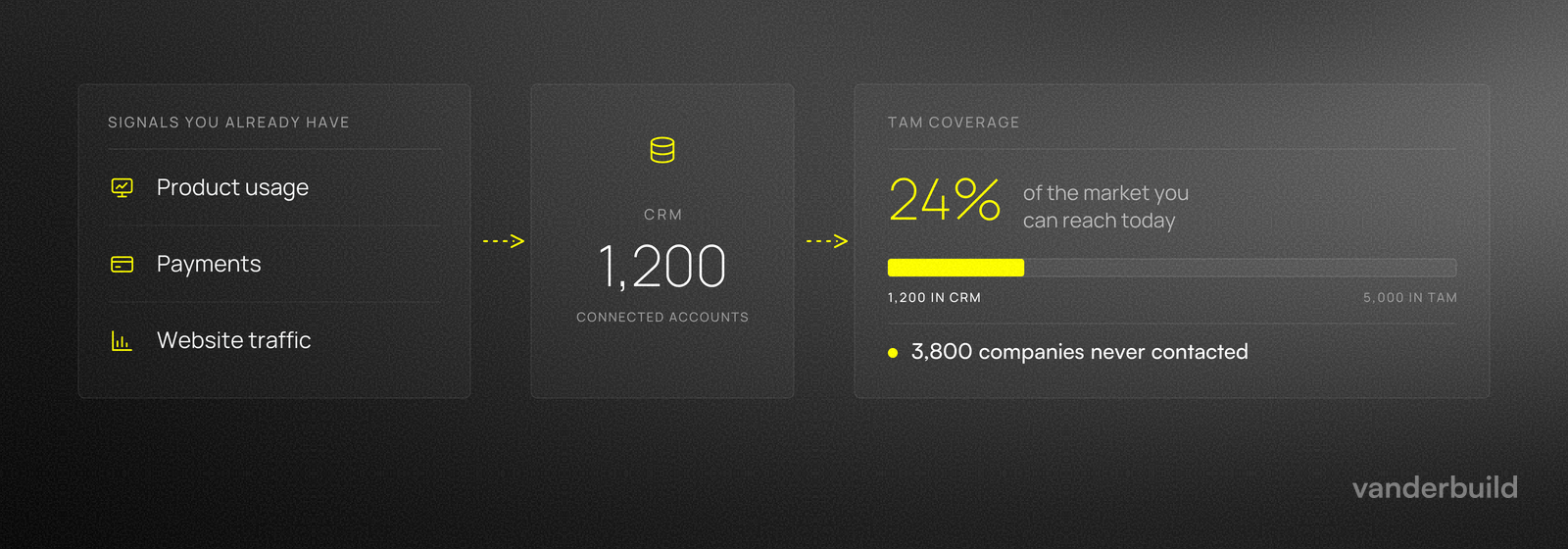
Data transformation rules ensure consistent formatting across platforms while maintaining system-specific requirements. Conflict resolution protocols handle situations where different systems contain contradictory information about the same record.
Output: Unified dashboards and automated actions
Unified data dashboards provide real-time visibility into pipeline health, lead progression, and team performance metrics. Automated workflows execute based on orchestrated data, triggering email sequences, task assignments, and follow-up reminders.
Think of how good your analytics currently are and if they are 100% correct. If not then it may be a good time to talk with proper specialists.
The system supports strategic planning and resource allocation decisions by providing comprehensive, current information about sales performance, market responses, and operational efficiency across all connected platforms.
What are the best practices for B2B sales data orchestration?
- Automate outbound workflow optimization
- Design automated sequences that trigger based on specific lead behaviors or demographic characteristics. Set up workflows that move prospects through appropriate nurture sequences without manual intervention while maintaining personalization elements.
- Implement lead scoring triggers for prioritization
- Use behavioral data to automatically identify high-value leads requiring immediate attention. Configure alerts that notify sales representatives when prospects reach predetermined engagement thresholds or exhibit buying signals.
- Set up predictive scoring models that combine demographic information with behavioral indicators to rank leads by likelihood to convert. Automate lead routing to appropriate team members based on territory, expertise, or availability.
- Maintain regular data hygiene practices
- Establish automated data validation rules that flag incomplete records, duplicate entries, or inconsistent information. Schedule regular data cleanup processes that standardize formatting, merge duplicate records, and update outdated information.
- Implement data enrichment workflows that automatically append missing information from trusted third-party sources. Configure alerts for data quality issues that require manual attention or system administrator intervention.
- Enable real-time lead routing efficiency
- Configure instant lead distribution based on predetermined criteria including geographic territory, product interest, company size, or lead source. Ensure backup assignment rules prevent leads from being orphaned when primary representatives are unavailable.
- Set up escalation workflows that reassign leads when initial contact attempts fail within specified timeframes. Monitor response times and conversion rates by routing rules to optimize assignment logic continuously.
- Invest in adaptable modern sales stack architecture
- Choose orchestration tools that integrate easily with your existing systems while supporting future platform additions. Prioritize solutions with robust APIs, extensive integration libraries, and flexible customization options.
- Plan for scalability by selecting tools that handle increased data volume and user growth without performance degradation. Consider platforms that offer both no-code configuration options and advanced customization capabilities for technical teams.
What mistakes should you AVOID with B2B sales data orchestration?
Letting data hygiene slide
If you don’t regularly clean and standardize your data, everything downstream gets worse. Duplicates, missing fields, and messy formatting quickly break automations and lead to bad decisions. Bad data orchestration spreads chaos faster.
Building integrations “just because you can”
Connecting every tool in sight without clear goals creates a tangled system that’s hard to maintain and frustrating to use. Start with a few key integrations tied to real outcomes (like faster lead routing or cleaner CRM records), then expand once those work well.
Treating orchestration like “set it and forget it”
APIs change, tools get updated, and your business evolves. Without monitoring and regular updates, integrations fail quietly, workflows go stale, and performance drops. Plan for ongoing ownership - maintenance isn’t optional.
Keeping too many manual steps
If people still copy-paste data or update multiple systems by hand, you lose most of the value of orchestration. Worse, “half automation” creates confusion: nobody knows what updates automatically and what doesn’t. Aim for end-to-end workflows so the team can trust the system.
What tools support B2B sales data orchestration?
Tool comparison
Clay, HubSpot and Freckle do different jobs
| Compare on |
 Clay
Orchestration
Clay
Orchestration
|
 HubSpot
System of record
HubSpot
System of record
|
 Freckle
Enrichment layer
Freckle
Enrichment layer
|
|---|---|---|---|
| What it does | Builds lists and runs enrichment waterfalls across providers, then pushes the result wherever it needs to go. | Holds the record. Pipelines, lifecycle stages, sequences and reporting all sit on top of it. | Sits on the CRM and fills missing fields from dozens of providers, asked for in plain language. |
| Pick it when | Someone will own it. Custom provider order, branching logic and scoring rules are the whole reason to be here. | You need one place the whole team writes to and reports from, with the automation attached to it. | Nobody wants to build workflows. Setup is short and needs no technical owner. |
| Skip it when | Nobody is going to maintain it. An unowned Clay table decays faster than the data inside it. | You expect it to source or repair data. It stores what it is handed, accurate or not. | You are not on HubSpot or Salesforce. Those are the only two it syncs with today. |
HubSpot is not an alternative to the other two. Clay and Freckle fill the record, HubSpot is where the record lives, and most teams end up with one of the first two plus a CRM. The choice that matters is Clay or Freckle, and it comes down to whether anyone on the team will own the build.
Integration platform categories
Native CRM integrations provide basic orchestration capabilities within platforms like HubSpot, Salesforce, and Pipedrive. These built-in options work well for teams using primarily one vendor's ecosystem with limited external tool requirements.
Third-party integration platforms like Zapier and Make offer broader connectivity options across different software vendors. These solutions support complex workflows and custom logic while maintaining user-friendly configuration interfaces but they do not cover spreadsheet like view which is the best for CRM-like data orchestration where you can analyse each record individually.
Agentic orchestration
Agentic solutions for data orchestration are basically automation platforms that use AI agents to plan + execute multi-step data work across tools.
Instead of hard-coding every rule, you can say: “Keep CRM data clean and route qualified leads correctly” and the agent figures out the steps - then runs them through approved connectors and guardrails.
What makes something “agentic” (vs normal orchestration)
A typical agentic setup has:
- Reasoning / planning: decides the sequence of actions to reach a goal (not just “if X then Y”).
- Tool use (“skills”): can call real systems (CRM, enrichers, email tools, data warehouse) through connectors.
- Guardrails + governance: scoped permissions, rules, approvals, logging, and monitoring - because agents can take real actions.
But from our point of view agentic systems are not yet ready to perform complicated tasks such as “clean up my CRM” or “reach out to every lost opportunity” - these tasks require perfectly clean data and they are just too big for agent - if thy will be divided into smaller tasks provided there are good guardrails installed then the system could work.
Example agentic tools for sales and marketing:
- Dust (custom agents for Sales + Marketing; connects to your tools/data).
- Cargo (AI “coworkers” to qualify, engage, and convert; built for GTM engineers).
- Copy.ai (agent/workflow-style GTM automation: prospecting > content > outreach).
- Relevance AI (agent platform with an “AI BDR/BDR agent” angle).
- n8n (automation workflows; often used as the backbone for agentic GTM systems)
How does B2B sales data orchestration work in real cases?
Case studies
Two campaigns that opened without a pitch
-
LinkedIn networking
MAN Digital
A RevOps consultancy tested whether asking sales and marketing leaders for feedback on a framework would open more doors than presenting one.
- 229People contacted
- 33Conversations started
- 14.4%Replied and engaged
-
CRM nurturing
Valueships
A pricing consultancy reopened contacts that had gone quiet months earlier, without the campaign reading as a cold approach to people who already knew them.
- 41.3%Replied to the campaign
- 60%Replied on LinkedIn
- 10%Wanted to talk
Both openings give the recipient something to answer. A framework to react to, or a conversation they had already started. The reply rates differ because one audience had met the company before and the other had not.
FAQ: B2B sales data orchestration
What is B2B sales data orchestration?
An integration framework to synchronize sales data across platforms, eliminating manual data entry and providing unified customer information across your tech stack.
How does it benefit sales operations?
Improves data accuracy, enhances team efficiency, and supports strategic decisions by providing real-time, comprehensive information about prospects and customers across all systems.
When should businesses implement it?
When scaling operations or integrating multiple sales tools, especially if teams spend significant time on manual data entry or struggle with incomplete customer information.
How much does it typically cost?
Costs vary based on tool complexity and business size, ranging from $50/month for basic automation to $500+/month for enterprise orchestration platforms.
What if my sales team is too small?
Smaller teams may not need full orchestration, but basic integration between core systems can help even small teams improve efficiency and data accuracy.
How do I start implementing it?
Begin by assessing current data flows and tool compatibility, identifying the most problematic manual processes, then implementing orchestration for those specific workflows first.
Can it work without a dedicated IT team?
Yes, many tools offer user-friendly interfaces for non-technical users, though complex integrations may require technical support for optimal configuration and maintenance.
Is real-time data necessary?
Real-time data enhances responsiveness but depends on business needs. Many orchestration benefits come from automated synchronization even if updates occur hourly or daily rather than instantly.
How secure is orchestrated data?
Security depends on tool provider and integration configurations. Choose platforms with proper encryption, access controls, and compliance certifications relevant to your industry requirements.
What if my CRM doesn't support integration?
Consider middleware solutions like Zapier or Make that connect systems without native integrations, or evaluate upgrading to a more integration-friendly CRM platform.
How long does implementation take?
Basic orchestration can be implemented in days or weeks, while comprehensive systems may require months depending on complexity, data volume, and customization requirements.
What happens when integrations break?
Reliable orchestration platforms include monitoring and alerting capabilities that notify administrators when integrations fail, enabling quick resolution to minimize data disruption.