.webp)
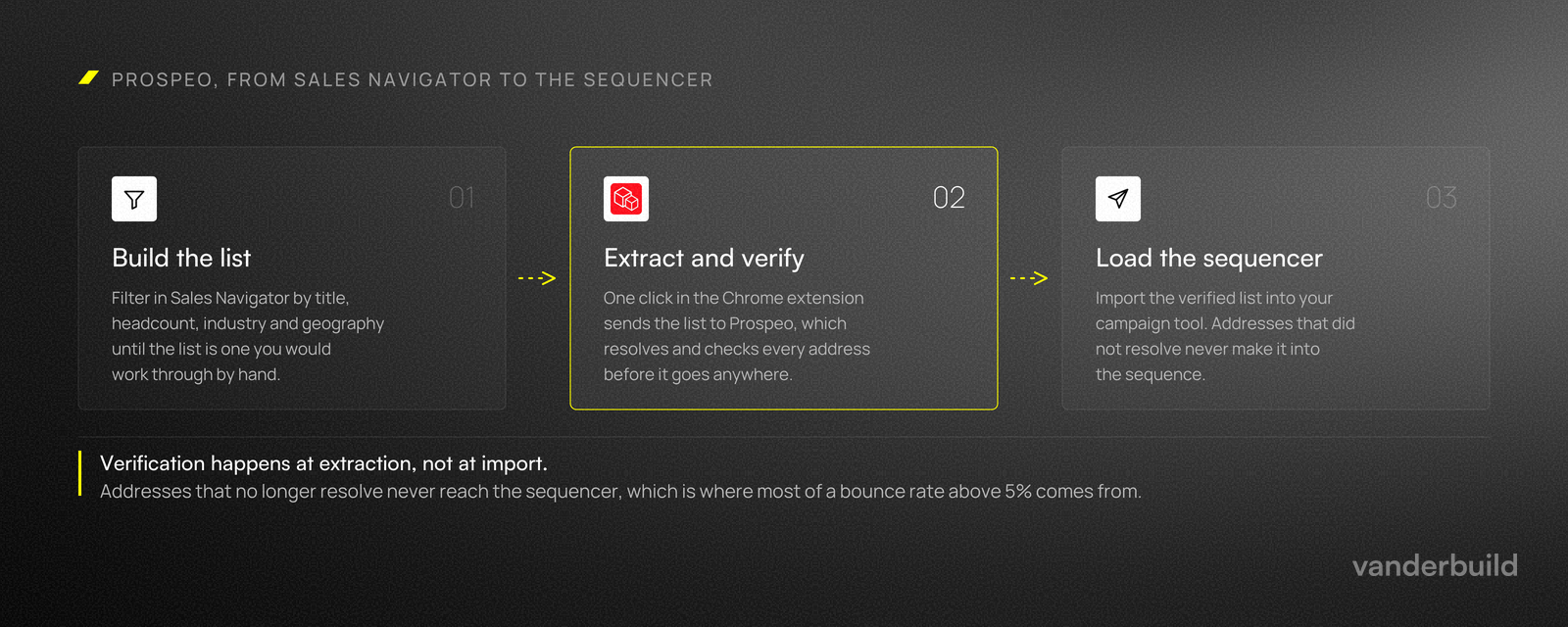
Prospeo is not a traditional lead database. It is an extraction and verification engine that enriches leads you have already identified, primarily through LinkedIn Sales Navigator and allows you to find and verify email addresses and phone numbers of prospects, within the company, based on full name and company domain or personal LinkedIn URL.
The most important thing is that Prospeo optimizes for data freshness and bounce prevention validating catch-all emails. From our tests on email finding and validation Prospeo had lower % of emails found than other tools but after checking deliverability of these emails Prospeo had highest % of emails valid meaning that they are not pushing you trash but actually high quality data.
Who Should Use Prospeo?
Prospeo is built for teams that rely on outbound via email, cold calling and linkedin and care deeply about sender reputation.
Typical users include:
- RevOps and Growth teams managing data quality
- SDR leaders running Sales Navigator-based prospecting
- Founders executing targeted outbound themselves
It is less suitable for teams looking to browse a massive internal lead database or generate leads without predefined targeting. Think of Prospeo as a data extractor and email finder.
How Does the Sales Navigator Export Engine Work?
Prospeo’s core feature is direct export from LinkedIn Sales Navigator. Users can extract filtered lead lists without manual copying.
Key fact: Prospeo supports exports of up to 2,500 contacts per list and can extract up to 45 data points per record = person + company.
In live usage, verified email retrieval rates typically range from 40% to 70%, depending on industry and role seniority.
What a 40 to 70% Retrieval Rate Means for Planning?
The retrieval range is the most important number in this article and the easiest to read past. It means that for every hundred people you export, between forty and seventy come back with a verified email. The rest come back with nothing usable, and you plan around the low end, not the average.
Work it backwards. If a campaign needs a thousand contactable people this month, you export somewhere between 1,430 and 2,500 records to get there. At the low end that is a full list export, which is the per-list cap. Two lists, then, and a decision about which segments get split across them.
The rate is not random. Seniority and industry move it, and the article says as much. Senior roles at larger companies resolve more often because the address pattern is documented somewhere public. Small companies and technical roles resolve less often, and non-English domains less often again. If your ideal customer profile sits at the harder end, budget for the low end of the range every month, not the midpoint.
One practical consequence. A segment that resolves at 40% is not automatically a worse segment. It is a more expensive one to reach, and the question is whether the accounts inside it are worth the extra extraction. That is a decision about deal size, not about data quality.
How Does Prospeo Handle Email Verification and Catch-All Domains?
Prospeo uses a conservative verification model designed to flag risky and catch-all emails aggressively.
The most important thing is that Prospeo prefers false negatives over false positives. This means fewer bounces, but potentially fewer total usable emails. Which is a better approach in our opinion in comparison to other data providers.
What Valid, Risky and Catch-All Actually Mean
Valid means the receiving server acknowledged that the specific mailbox exists. This is as close to certainty as email verification gets, and these addresses go into the campaign without further thought.
Catch-all means the domain accepts mail for every address, whether or not the mailbox exists. The server will not tell you the difference, so the address might be perfect or might bounce. Large companies configure catch-all deliberately, which means catch-all correlates with the accounts you most want. Prospeo flags them instead of passing them off as valid, and that is the conservative choice the article is describing.
Risky covers everything else the check could not settle: temporary server failures, greylisting, role addresses, and domains that answer inconsistently.
What to do with each is the part that matters. Valid goes straight into the sequencer. Risky and catch-all go into a separate list, and what happens to that list depends on how big your market is. With ten thousand addressable companies, delete them and move on. With four hundred, run them through a second verifier, and send what survives from a domain that is not your main sending domain.
What Can You Do with the Prospeo API?
Prospeo offers a stable API for email finding, mobile number retrieval, and email verification. It can be easily connected to data orchestrators such as Clay.
Responses are lightweight JSON objects containing validity status and domain metadata, making Prospeo suitable for real-time CRM enrichment.
Where Prospeo Sits in a Stack?
In the simplest setup, there are three parts. Sales Navigator holds the targeting. Prospeo turns the targeting into contactable records. A sequencer sends. Nothing else is needed, and for most teams running one or two campaigns, nothing else should be added.
The API widens what is possible. It does not add anything you need on day one. Connected to an orchestrator like Clay, Prospeo becomes one step in a waterfall: another provider tries first, Prospeo picks up what it missed, or the reverse, depending on which resolves your segment better. Teams that run this well test both orders on the same list before deciding.
The second use is inbound. A form submission arrives with a work email and nothing else, and the API fills the rest before the record reaches a rep. This is the highest-value use of the API and the one most teams get to last, because it needs somebody who owns the CRM, not somebody who owns the campaign.
Mobile Number Enrichment: When Does It Make Sense?
Prospeo can retrieve mobile numbers directly from LinkedIn profiles. This feature is significantly (10x) more expensive than email enrichment but still costs the same amount as other mobile number providers.
One mobile number costs 10 credits, compared to 1 credit for a verified email.
This makes mobile enrichment viable mainly for high-value ABM or enterprise accounts.
How much does Prospeo cost?
Prospeo uses a credit-based subscription model with plans ranging from approximately $49 to $369 per month.
You are not charged for duplicates within the same billing cycle, and credits are only spent on verified results.
Key limitation: Credits do not roll over month to month, requiring careful usage planning.
What a Month Actually Costs?
The plans run from roughly 49 to 369 dollars a month, and credits are spent only on verified results. Both facts are in the article. Neither tells you what your month costs, so here is the arithmetic.
Say you need a thousand verified emails. Verified results cost one credit each, so that is a thousand credits, regardless of how many records you had to extract to find them. That part is genuinely favourable, and it is the strongest thing about the pricing model: unresolved lookups are free.
Now add mobile numbers for a tenth of that list. A hundred numbers at ten credits each is another thousand credits. Adding mobile to 10% of your contacts doubles the bill. That single ratio should decide whether mobile enrichment belongs in your workflow at all, and the answer is usually that it belongs on a named account list and nowhere else.
Then there is the limitation the article flags and does not cost out. Credits expire monthly. If your volume swings between six hundred and fourteen hundred contacts, a plan sized for the peak wastes credits in every quiet month, and a plan sized for the floor blocks you in the busy ones. Size for the floor and accept that you top up, because unused credits are gone and the alternative is paying for capacity you did not use.
Prospeo vs Common Alternatives
Prospeo vs Apollo
Apollo provides an all-in-one database and engagement platform. Prospeo focuses on fresh extraction from LinkedIn with higher verification strictness.
Prospeo vs Outreach Tools
Prospeo does not send emails or automate sequences. It feeds clean data into outbound platforms.
Prospeo vs Domain-Based Finders
Compared to domain search tools, Prospeo offers tighter integration with Sales Navigator and role-level targeting.
When Prospeo Is the Wrong Tool?
Three situations, and the article gestures at one of them.
You do not know who you are targeting yet. Prospeo enriches a list you already built. If the Sales Navigator query is guesswork, the output is verified contact details for the wrong people, which is worse than no list because it looks finished.
You need volume more than accuracy. A conservative verifier returns fewer usable addresses by design. If your model depends on contacting everyone in a large market and absorbing the bounces, a stricter tool costs you reach and charges you for the privilege.
Nobody owns the export. The workflow has manual steps: build the query, run the export, sort the statuses, load the sequencer. It takes under an hour and it has to happen every time. Without a name attached to it, the list ages and the next campaign runs on last quarter's data.
How to Implement Prospeo in Practice?
Step 1: Define ICP in Sales Navigator
Build a precise Sales Navigator query using role, seniority, geography, and company size.
Step 2: Export and Enrich
Run the Prospeo export. Processing around 1,500 leads typically takes about 20 minutes.
Step 3: Sanitize the Output
Filter for “Valid” emails and upload them directly into your outbound tool.
Step 4: Optional Secondary Verification
If TAM is limited, recycle “Risky” emails through a secondary verifier.
Step 5: Automate with API
Advanced teams can enrich inbound or CRM records in real time using the Prospeo API.
What We Would Change?
Two things, on the basis of using it rather than reading the marketing page.
Credit expiry is the weakest part of the model. It penalises the usage pattern outbound actually has, which is uneven, and it pushes you toward a smaller plan than your work needs.
The second is a documentation gap, not a product one. The distinction between risky and catch-all matters enormously for what you do next, and it is not explained anywhere a new user will find it. Most people discover it by uploading a list, watching the bounce rate, and working backwards.
FAQ
Is Prospeo a lead database?
No. You must provide leads from LinkedIn or CSV files.
How accurate is Prospeo email verification?
It is intentionally conservative to minimize bounce risk.
Does Prospeo support bulk exports?
Yes, up to 2,500 contacts per list.
Are credits refunded for invalid results?
Credits are only spent on verified data.